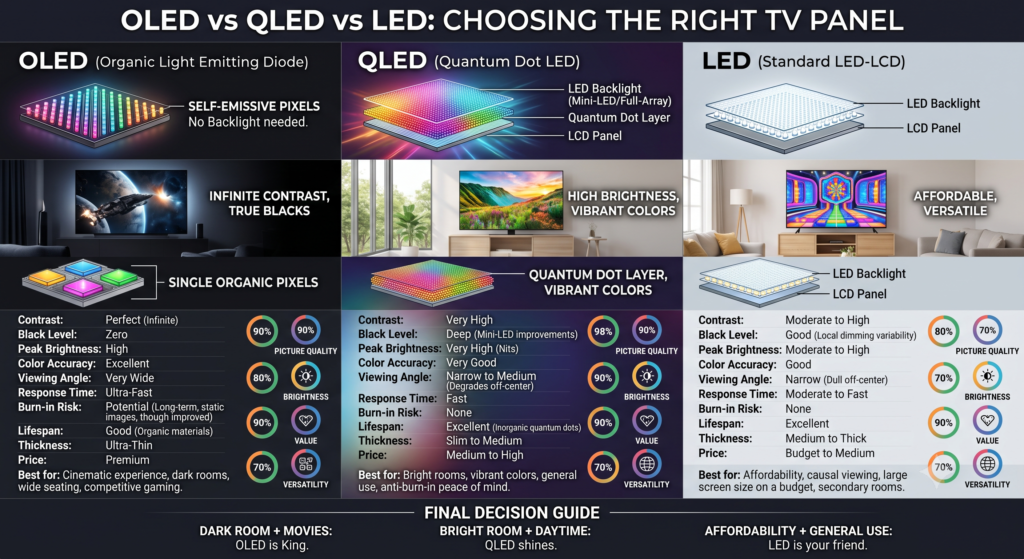
Television marketing has produced a genuinely confusing situation, and it’s not entirely accidental. OLED and QLED differ by a single letter and sound like variations on a theme. They’re fundamentally different technologies. LED and QLED sound like different things and are closely related.
Here’s what’s actually happening inside each, and which one suits which room.
The fundamental divide: backlit vs self-emissive
Every television falls into one of two categories, and this is the distinction that matters.
Backlit displays have a layer of LEDs behind an LCD panel. The LCD acts as a shutter, blocking or allowing light through for each pixel. Because the backlight is always on, blocking it perfectly is impossible; some light leaks through, so black appears as dark grey.
Self-emissive displays have pixels that generate their own light. A black pixel is a pixel that’s off. No light, genuine black.
LED and QLED are backlit. OLED is self-emissive. Everything else follows from this.
LED (really LCD)
What’s sold as an “LED TV” is an LCD panel with LED backlighting. The LED part refers only to the light source.
Backlight arrangement matters enormously and is frequently unstated:
Edge-lit panels have LEDs along the edges, with light distributed across the panel by a diffuser. Cheap, thin, and the source of most complaints about uneven brightness and glowing corners.
Direct-lit panels have LEDs behind the panel but with few or no dimming zones, better uniformity, minimal contrast benefit.
Full-array local dimming (FALD) has many LEDs behind the panel, grouped into zones that dim independently. This substantially improves contrast, and the number of zones determines how substantially. A panel with 500 zones performs far better than one with 32.
If you’re buying an LED television, local dimming and zone count are the specifications that determine whether it looks good. They’re also the ones most often omitted from listings.
Halo effect is the characteristic limitation: a bright object on a dark background produces a visible glow around it, because the dimming zone is larger than the object.
QLED
QLED is an LED television with a quantum dot layer added.
Quantum dots are microscopic particles that emit very precise colours when illuminated. Placed between the backlight and the LCD layer, they produce purer, more saturated colour and allow higher brightness without colour washing out.
What QLED improves: colour volume, particularly at high brightness. Peak brightness. HDR highlight performance.
What QLED doesn’t change: it’s still backlit. Black levels remain limited by backlight leakage. Viewing angles remain narrower than OLED. Contrast still depends on local dimming quality.
A well-implemented conventional LED with many dimming zones can outperform a QLED without good local dimming. The quantum dot layer improves colour, not contrast.
Where QLED excels: bright rooms. Because it gets considerably brighter than OLED and handles reflections better, a QLED in a sunlit living room will frequently look better than an OLED in the same space.
OLED
Each pixel generates its own light and switches off completely for black.
What this delivers: perfect blacks, effectively infinite contrast, no halo effect whatsoever, exceptional viewing angles with minimal colour shift, and near-instantaneous pixel response, which matters for both fast motion and gaming.
The limitations:
Peak brightness is lower than high-end QLED, though this has improved considerably with newer panel types. In a very bright room, an OLED can look dim by comparison.
Burn-in risk is real but widely overstated. Static elements displayed at high brightness for extended periods — news tickers, channel logos, gaming HUDs, can leave permanent traces. Modern panels include pixel shifting, logo dimming, and refresh cycles that make this unlikely for varied viewing. Someone leaving a single channel on for eight hours daily should think carefully; someone watching varied content should not worry.
Price remains higher, particularly at larger sizes.
Where OLED excels: dim or controlled lighting. Film watching, anything with dark scenes, where the difference from backlit panels is immediately visible rather than subtle.
Newer variations worth knowing
QD-OLED combines a self-emissive OLED layer with quantum dots for colour. It delivers OLED’s perfect blacks alongside improved colour volume and brightness. Currently premium-priced.
Mini-LED uses far smaller LEDs, allowing hundreds or thousands of dimming zones rather than dozens. This dramatically reduces halo effects while retaining LEDs’ brightness advantage. It’s the most credible challenge to OLED for mixed lighting conditions.
Micro-LED is self-emissive with inorganic LEDs, no burn-in risk, extreme brightness, perfect blacks. Currently priced for installations rather than living rooms.
The deciding factor: your room
More than any specification, the light in your room should determine your choice.
Bright room, large windows, daytime viewing: QLED or Mini-LED. Their brightness advantage matters, and OLED’s contrast advantage is largely invisible when ambient light is washing the screen anyway.
Dim room, controlled lighting, evening viewing: OLED. This is where the technology’s advantages are most apparent and most worth paying for.
Mixed use: Mini-LED offers the most balanced compromise, or a bright OLED if the budget allows.
Specifications that matter more than panel type
Refresh rate: 120Hz makes a visible difference for sports and gaming. For film and television, which are mastered at 24 frames per second, it matters far less.
HDR format support: Dolby Vision and HDR10+ are competing dynamic metadata formats. Content availability varies by service. HDR10 is universal.
Input lag: for gaming, look for figures under 15 milliseconds in game mode. OLED’s pixel response is inherently superior here.
HDMI 2.1: needed for 4K at 120Hz from current consoles and graphics cards. Check how many ports support it; some televisions have only one or two.
Processing quality: frequently underappreciated. A television’s image processor handles upscaling, motion, and noise reduction. Since most content isn’t native 4K, upscaling quality substantially affects what you actually see. This is where premium models from established manufacturers earn their price over budget alternatives with identical panel specifications.
Practical advice
Size matters more than panel technology for perceived quality. A larger television at a moderate specification generally satisfies more than a smaller premium one, provided your viewing distance suits it.
View in person if possible, but be aware that showroom settings are configured for maximum impact under bright retail lighting, not representative of your living room.
Last year’s premium model at a discount frequently beats this year’s mid-range model at the same price. Television technology iterates slowly, and the differences between adjacent generations are usually minor.
Finally: whatever you buy, adjust the picture settings. Factory defaults are configured to stand out in stores, with excessive brightness, oversaturated colour, and motion smoothing that makes films look like video. A few minutes in the settings menu, selecting Filmmaker or Cinema mode and turning off motion interpolation, improves the image more than a substantial price increase would.